In this post, we’ll learn how to read events from the calendar in our SwiftUI application. In the next one, we’ll learn how to add an event to the calendar.
For today’s events, I display only the title:
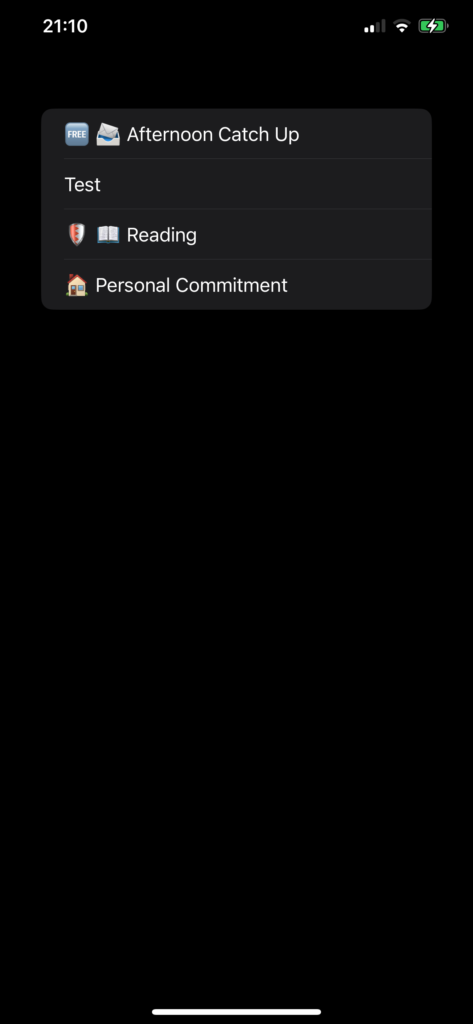
We need to complete two steps:
- Add ‘Privacy – Calendars Usage Description’ to the info.plist for full calendar access.
- Create an event manager.
The Event Manager
import Foundation
import EventKit

@Observable
class EventStoreManager {
    public var events = [EKEvent]()
    let eventStore = EKEventStore()

    func fetchEvent(date: Date) -> [EKEvent] {
        let start = Calendar.current.startOfDay(for: date)
        let end = Calendar.current.date(byAdding: .day, value: 1, to: start) ?? Date()
        let predicate = eventStore.predicateForEvents(withStart: start, end: end, calendars: nil)
        return eventStore.events(matching: predicate)
    }

    func authorizationStatus() async throws -> Bool {
        return try await eventStore.requestFullAccessToEvents()
    }

    func setEventDate(date: Date) async throws {
        let response = try await authorizationStatus()
        if response {
            self.events = fetchEvent(date: date)
        }
    }
}
First step: Import EventKit. The class is annotated with @Observable to utilize the latest powerful features from iOS 17, allowing the UI to simply reflect changes in this class.
The authorization function is crucial as it requires user permission to access calendar app data. Without this permission, no events can be retrieved.
Events are returned by the fetchEvent function. In this function, the start and end dates are calculated (from 00:00 to 24:00 of the current day in the example). Then, a predicate is created to query the events within that interval.
The ContentView is simple:
struct ContentView: View {
    @State var eventsManager = EventStoreManager()
    var body: some View {
        VStack {
            List(eventsManager.events, id:\.self) { event in
                Text(event.title)
            }
        }.task {
            do {
                try await eventsManager.setEventDate(date: Date())
            } catch {
                print("Error")
            }
        }
        .padding()
    }
}
The eventsManager variable is defined as a @State to capture every change in it (recall that it’s observable). Thus, when the app is displayed, we set the date to search for events (simplified to the current day). The events that are returned are then displayed in a list.
The code is here https://github.com/niqt/CalendarAppExample
To subscribe to my newsletter [https://nicoladefilippo.com/#mailinglist]
Note: English is not my native language, so I apologize for any errors. I use AI solely to generate the banner of the post; the content is human-generated.