
Many times in an app, we need to display a set number of static information items. For example, consider a user profile. While our initial instinct might be to use a list, it’s not always the best choice. Lists are typically designed for displaying an undefined number of elements. In cases where we have a fixed number of information pieces to show, it’s more appropriate to use a Form to achieve a structured layout like this:
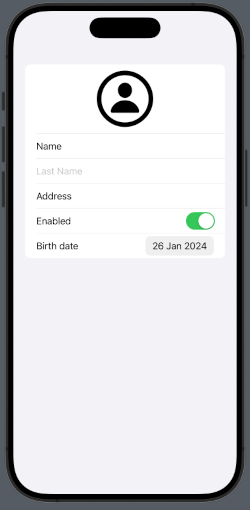
The code is:
struct ContentView: View {
    @State var second: String = ""
    @State var enabled: Bool = true

    var body: some View {
        VStack {
            Form {
                HStack {
                    Spacer()
                    Image(systemName: "person.circle")
                        .resizable()
                        .frame(width: 100, height: 100)
                    Spacer()
                }
                Text("Name")
                TextField("Last Name", text: $second)
                Text("Address")
                Toggle(isOn: $enabled) {
                    Text("Enabled")
                }
                DatePicker(selection:.constant(Date()), displayedComponents: [.date], label: { Text("Birth date") })
            }
        }
    }
}
In a Form, we have the flexibility to incorporate various types of objects. For example, you can include an image (within an HStack), a read-only text, a text field, a toggle switch, and a date picker. You can even add buttons and more.
That’s all for this episode. In the next one, we’ll learn how to save the information displayed in the form.