Async Image in SwiftUI

If your app needs to display images that are hosted on a server, this post is for you. It’s a common scenario where images aren’t downloaded or are not present in the application’s assets. Another common issue is displaying a progress indicator until the image is fully displayed. AsyncImage is the solution to all these requests.

IIn this post, I use as a starting point the code discussed in a previous post (https://nicoladefilippo.com/pull-refresh-in-swiftui/), where we loaded a list of beer names. Now, we will also add images. Here is the code:

struct Beer: Codable, Identifiable {
    var id: Int
    var name: String
}

struct ContentView: View {
    @State var beers: [Beer] = []
    @State var page = 0
    var body: some View {
        NavigationStack {
            List(beers) { beer in
                Text(beer.name)
            }.refreshable {
                await getBeers()
            }
        }.onAppear {
            Task {
                await getBeers()
            }
        }
    }
    
    func getBeers() async {
        do {
            page += 1
            let url = URL(string: "https://api.punkapi.com/v2/beers?page=\(page)&per_page=30")!
            let (data, _) = try await URLSession.shared.data(from: url)
            let beersDownloaded = try JSONDecoder().decode([Beer].self, from: data)
            beers = beersDownloaded + beers
        } catch {
            print("Error")
        }
    }
}

To make improvements, first, add the image field to the Beer struct:

struct Beer: Codable, Identifiable {
    var id: Int
    var name: String
    var image_url: String
}

Now that we have the information, let’s take a look at how to display it:

AsyncImage(url: URL(string: beer.image_url)) { image in
         image.resizable().scaledToFit()
     } placeholder: {
         ProgressView()
     }.frame(width: 50, height: 50)

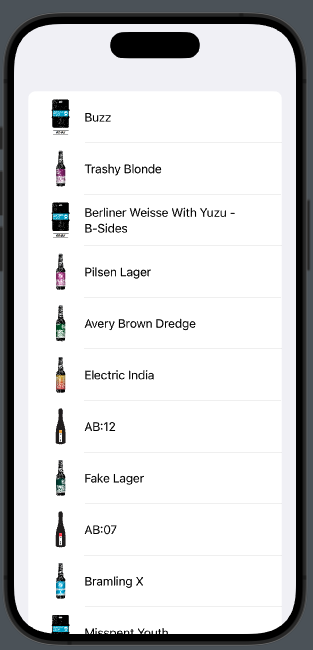
So, AsyncImage takes a URL, and until the image is displayed, a ProgressView is shown. Once the image becomes available, it’s resized proportionally to fit the size of the frame.

Now, let’s proceed with a list written in the following manner:

List(beers) { beer in
                HStack {
                    AsyncImage(url: URL(string: beer.image_url)) { image in
                        image.resizable().scaledToFit()
                    } placeholder: {
                        ProgressView()
                    }.frame(width: 50, height: 50)
                    Text(beer.name)
                }
            }

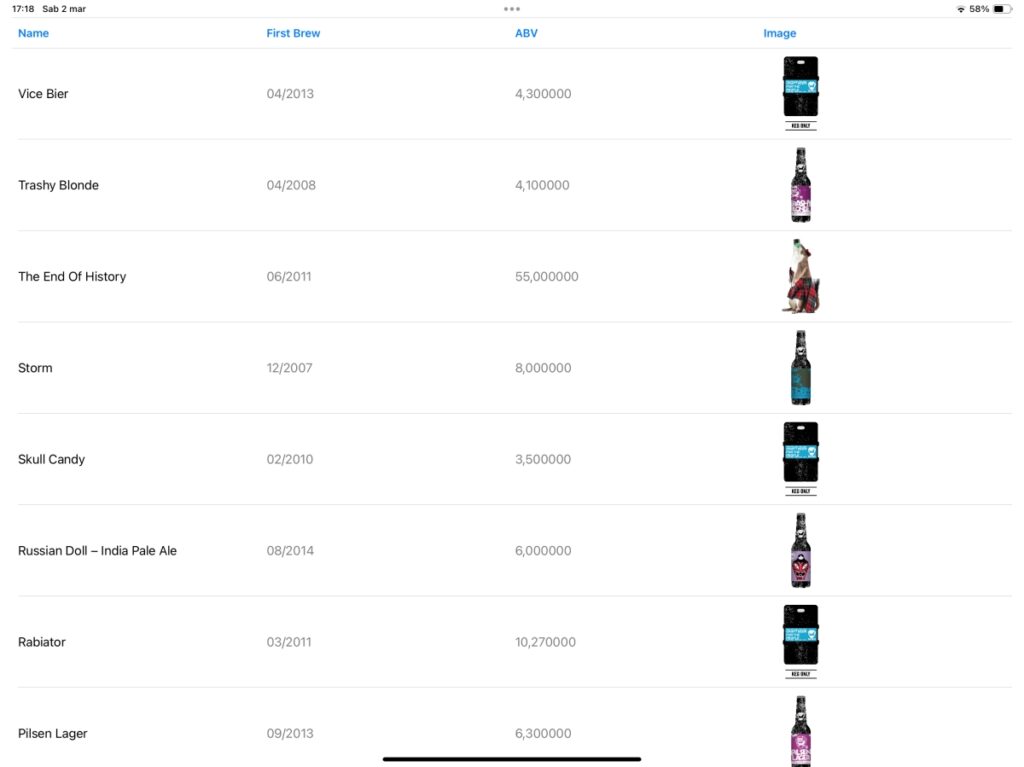
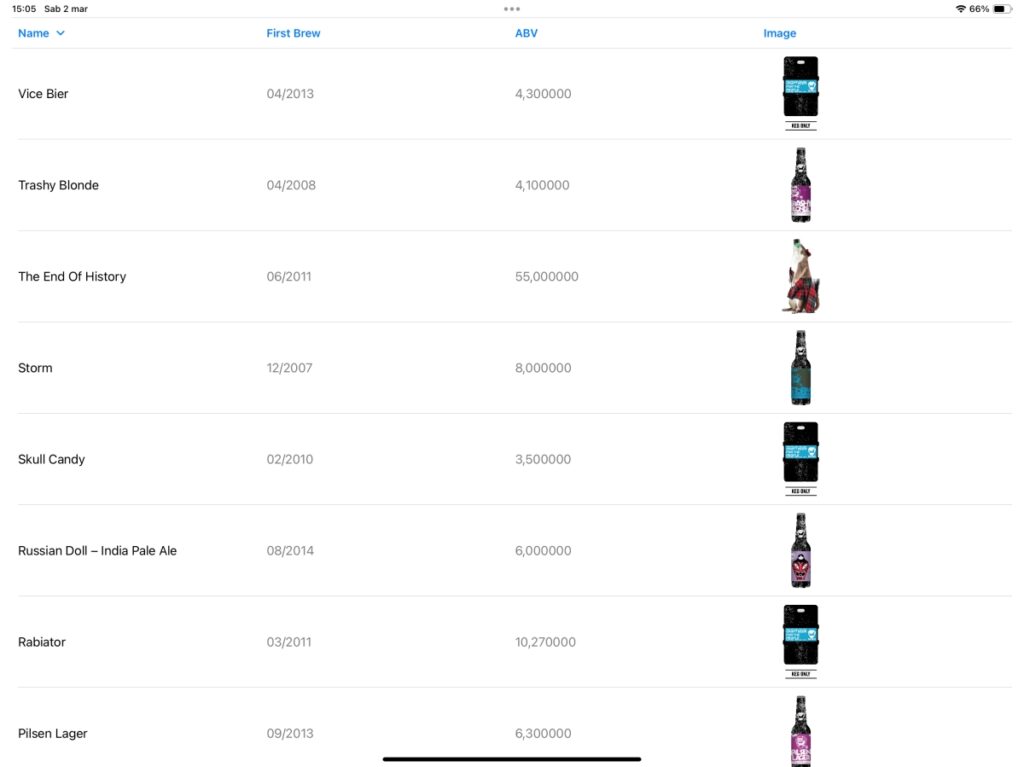
We have:

Pull refresh in SwiftUI

How many apps do you know that implement the pull-to-refresh feature? If you’re interested in learning how to create this helpful functionality in your app, you can read this post.

Let’s start with the basics:

struct ContentView: View {
    var body: some View {
        NavigationStack {
            List(1..<30) { n in
                Text("Beer \(n)")
            }
            .refreshable {
                print("Load other beer")
            }
        }
    }
}

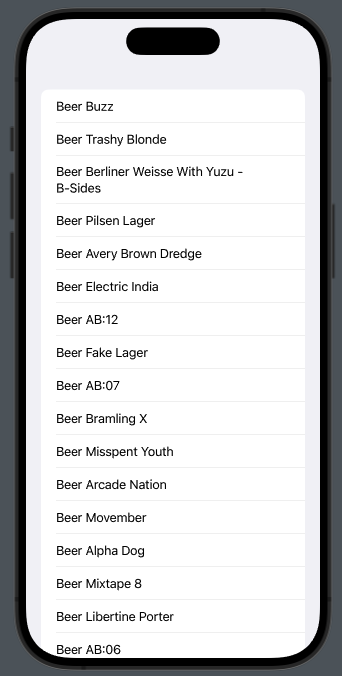
This code displays a simple list of beers identified by name, with the important part being the refreshable feature. It’s this last feature that creates the graphical effect for the pull action and executes the code within the parentheses asynchronously (where the print instruction is located).

Real Example

Starting from this point, let’s try to create something a bit more complex and realistic. We aim to load beers, 30 per page, and when we perform the pull action, we want to download and display another 30 beers. The beers are sourced from: https://api.punkapi.com/v2/beers

First, create the struct for the beer, as we only want to retrieve the name:

struct Beer: Codable, Identifiable {
    var id: Int
    var name: String
}

The Beer struct needs to conform to the Codable protocol because we want to decode the JSON information. Additionally, it should implement the Identifiable protocol since we intend to display the beers in a list, which requires a unique identifier for each item.

Now implement the pull action:

struct ContentView: View {
    @State var beers: [Beer] = []
    @State var page = 0
    
    var body: some View {
        NavigationStack {
            List(beers) { beer in
                Text("Beer \(beer.name)")
            }
            .refreshable {
                await getBeers()
            }
        }.onAppear {
            Task {
                await getBeers()
            }
        }
    }
    func getBeers() async {
        // get the beers
    }
}

Thus, we declare an empty array that is filled with the initial set of beers when the view is displayed, and additional beers are downloaded when we perform the pull-to-refresh action. We also declare a page variable, which will be incremented with each request. Note how we need to declare a Task in the onAppear modifier to execute an asynchronous action. However, in the .refreshable modifier, we do not need to explicitly create a Task because it is designed to handle such actions directly.

Take a look to the getBeer function:

func getBeers() async {
        do {
            page += 1
            let url = URL(string: "https://api.punkapi.com/v2/beers?page=\(page)&per_page=30")!
            let (data, _) = try await URLSession.shared.data(from: url)
            let beersLoaded = try JSONDecoder().decode([Beer].self, from: data)
            beers = beersLoaded + beers
        } catch {
            print("Some error")
        }
    }

In this function, we increase the page number and use this number as a parameter in the URL to fetch 30 beers at a time. If there are no errors, the new beers are appended to the front of the beer array.

Drink in moderation!

Note: English is not my native language, so I apologize for any errors. I use AI solely to generate the banner of the post; the content is human-generated.

Advanced DatePicker in SwiftUI

How can we allow the user to select a date within a defined range? If you’re seeking an answer, read this post.

In this post, you’ll learn how to define different ranges:

  • From a start date to the end of time.
  • From the distant past to a defined endpoint.
  • Within a well-defined range.

Let’s get started.

From a start date to the end of time

struct ContentView: View {
        var startDate = Date()
        @State private var dateSelected = Date()
        var body: some View {
            VStack {
                DatePicker(
                    "Select a date",
                    selection: $dateSelected,
                    in: startDate...,
                    displayedComponents: [.date])
                .padding()
            }
        }
    }

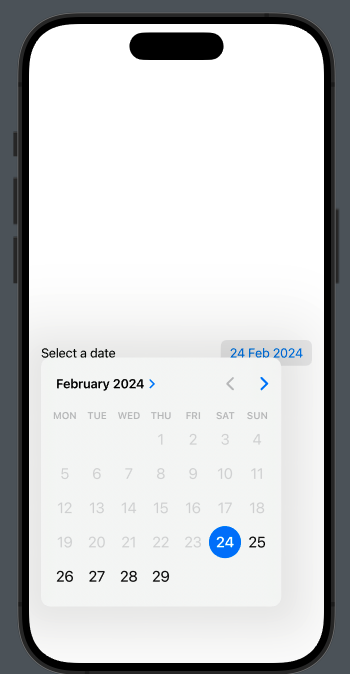
Therefore, we set the startDate to today, just to simplify things. In the DatePicker, we define the range with:

in: startDate...,

So, from today to end of the time.

From the distant past to a defined endpoint

This is the dual of the previous case; here, we invert the range:

in: ...endDate,

where endDate is

var endDate = Date()

To have

Within a well-defined range

As you can imagine, we need to define a range:

let dateRange: ClosedRange<Date> = {
        let calendar = Calendar.current
        let startComponents = DateComponents(year: 2024, month: 2, day: 2)
        let endComponents = DateComponents(year: 2024, month: 2, day: 27)
        return calendar.date(from:startComponents)!
        ...
        calendar.date(from:endComponents)!
    }()

ClosedRange is a structure that allows us to define an interval between an upper and a lower bound.

DateComponents allow us to specify a date using year, month, day, hour, and minutes.

In this example, we use only year, month, and day. Feel free to modify the example by also including hour and minutes in the range.

struct ContentView: View {
    let dateRange: ClosedRange<Date> = {
        let calendar = Calendar.current
        let startComponents = DateComponents(year: 2024, month: 2, day: 2)
        let endComponents = DateComponents(year: 2024, month: 2, day: 27)
        return calendar.date(from:startComponents)!
        ...
        calendar.date(from:endComponents)!
    }()
    @State private var dateSelected = Date()
    
    var body: some View {
        VStack {
            DatePicker(
            "Pick a date",
            selection: $dateSelected,
            in: dateRange,
            displayedComponents: [.date])
            .padding()
        }
    }
}

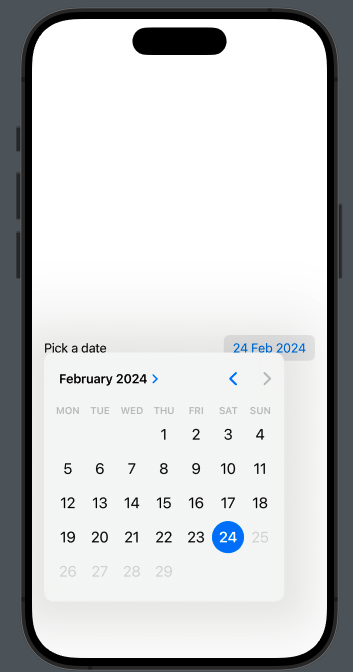
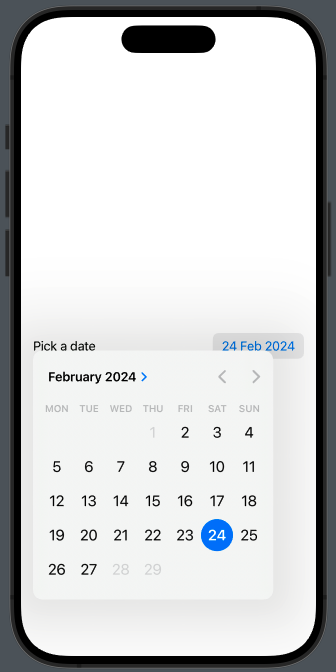
In this case we have:

Thanks for reading.

Note: English is not my native language, so I apologize for any errors. I use AI solely to generate the banner of the post; the content is human-generated.

Pickers in SwiftUI

In this post, I’ll present a list of the principal pickers in SwiftUI:

  • Default Picker
  • Date Picker
  • Color Picker
  • Segmented Controller (yes, it’s a picker)
  • Wheel

Default Picker

The code:

struct ContentView: View {
    var films = ["A New Hope", "The Empire Strikes Back", "Return of the Jedi "]
    @State private var selectedFilm = "The Empire Strikes Back"

    var body: some View {
        VStack {
            Picker("Please choose a film", selection: $selectedFilm) {
                ForEach(films, id: \.self) { film in
                    Text(film)
                }
            }
            Text("You selected: \(selectedFilm)")
        }
    }
}

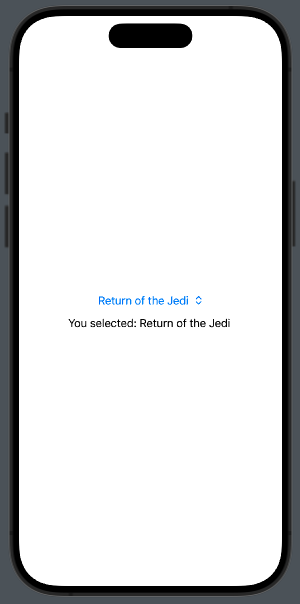
In this case, we show three film names, starting with the second one selected.

Date Picker

Now, we want to use a picker to select a date; in this case, we have more options:

struct ContentView: View {
    @State private var date = Date()

    var body: some View {
        VStack {
                DatePicker(
                    "Start Date",
                    selection: $date,
                    displayedComponents: [.date, .hourAndMinute]
                )
            Text(date.ISO8601Format())
        }
    }
}

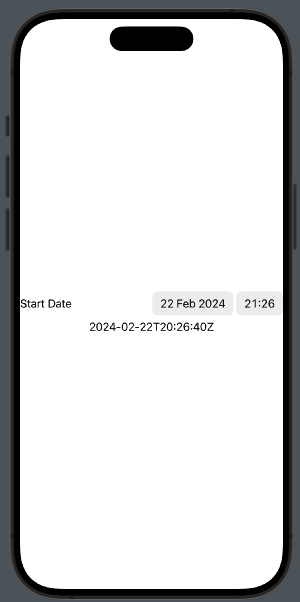
In this example, we set the DatePicker to the current datetime, and show the date, hours, and minutes (we can also choose to display only one, or both pieces of information).

If we want to display a calendar, we have to set datePickerStyle(.graphical) in this way:

DatePicker(
                    "Start Date",
                    selection: $date,
                    displayedComponents: [.date, .hourAndMinute]
                ).datePickerStyle(.graphical)

Color Picker

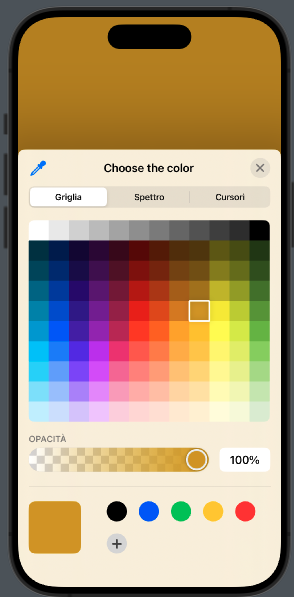
Sometimes, we want the user to choose a color, whether for settings or in a drawing application. In this case, we use the ColorPicker. In the code below, we select a color, and it becomes the background color of the view:

struct ContentView: View {
    @State private var bgColor =
            Color(.sRGB, red: 1, green: 1, blue: 1)

    var body: some View {
        ZStack {
            Color(bgColor)
            ColorPicker("Choose the color", selection: $bgColor)
        }.ignoresSafeArea(edges: .all)
    }
}

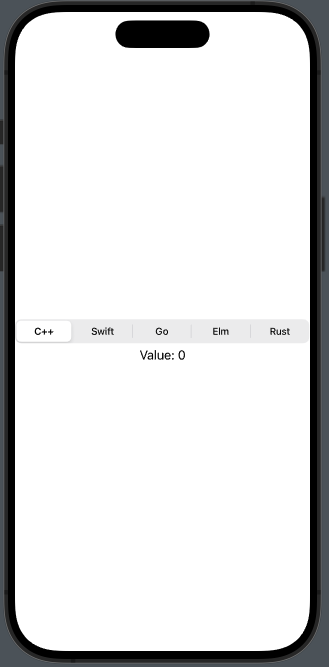
Segmented Controller

This is a picker that can create confusion, at least by its name, because usually this type of component is called ‘Segmented something.’ However, in SwiftUI, it’s simply called a Picker.

struct ContentView: View {
    @State private var selectedLanguage = 0

    var body: some View {
        VStack {
            Picker("What is your favorite language?", selection: $selectedLanguage) {
                Text("C++").tag(0)
                Text("Swift").tag(1)
                Text("Go").tag(2)
                Text("Elm").tag(3)
                Text("Rust").tag(4)
            }
            .pickerStyle(.segmented)

            Text("Value: \(selectedLanguage)")
        }
    }
}

Wheel

To have the wheel, it is sufficient to change the pickerStyle to .wheel in the example above.

I invite you to use this type of components whenever possible to avoid requiring users to type. Typing can be a tedious action, and it also increases the chance of inserting incorrect data.

Note: English is not my native language, so I apologize for any errors. I use AI solely to generate the banner of the post; the content is human-generated.
Menu in SwiftUI

I believe there’s a component that isn’t utilized often: the Menu, especially on the iPhone. The situation for the iPad, however, is somewhat different. In this post, we’ll take a closer look at this component.

When we select the Menu component from the list of components, the code will look something like this:

Menu("Menu") {
    Text("Menu Item 1")
    Text("Menu Item 2")
    Text("Menu Item 3")
}

It’s a list of elements that aren’t ‘clickable’, but we’re looking for something interactive. In the menu, we can insert any element we desire. In this case, we will add three buttons: the first will allow us to open a Color Picker, while the other two will do nothing.

Menu("Menu") {
      Button(action: {
          presentColorPicker.toggle()
      }) {
         Label(
             title: { Text("Color") },
             icon: { Image(systemName: "eyedropper.full")}
         )
      }
      Button("Option 1") {
                        
      }
      Button("Option 2") {
                        
      }
}

To display:

Now, let’s take a look at the entire code. By selecting a color, the background color of the screen will change.

struct ContentView: View {
    @State var colorSelected = Color.white
    @State var presentColorPicker = false
    var body: some View {
        NavigationStack {
            ZStack {
                Color(colorSelected)
                Image(systemName: "globe")
                    .imageScale(.large)
                    .foregroundStyle(.tint)
            }
            .background(colorSelected)
            .toolbar {
                Menu("Menu") {
                    Button(action: {
                        presentColorPicker.toggle()
                    }) {
                        Label(
                            title: { Text("Color") },
                            icon: { Image(systemName: "eyedropper.full")}
                        )
                    }
                    Button("Option 1") {
                        
                    }
                    Button("Option 2") {
                        
                    }
                }
            }
        }.sheet(isPresented: $presentColorPicker) {
            ColorPicker("Select a Color", selection: $colorSelected)
                .padding()
        }
    }
}

Consider incorporating this component into your next app.

Note: English is not my native language, so I apologize for any errors. I use AI solely to generate the banner of the post; the content is human-generated.